

Description
Download HSLAB Print Logger SE – Free Trial for Windows, Secure Print Monitoring & Cost Tracking Tool
HSLAB Print Logger SE is a powerful, lightweight utility designed for Windows users who need detailed print job tracking, real-time cost accounting, and efficient printer queue management. Developed by Printlogger, this software has been a trusted solution since 2007, offering a secure and reliable way to monitor printing activities across networks. Ideal for small to medium businesses, schools, and offices, HSLAB Print Logger SE helps organizations reduce printing waste, enforce usage policies, and gain full visibility into print expenses. With its intuitive interface and minimal system footprint, it runs smoothly on older Windows systems like Windows 2000, XP, and Server 2003. The latest version, 5.0.41.397, released on June 7, 2007, includes key improvements such as a built-in cost accounting engine, enhanced printer queue management, and customizable hint display timing. While the software is available as a free trial, full access requires a license purchase after the trial period. Whether you're managing a shared printer or monitoring multiple print devices, HSLAB Print Logger SE delivers essential tools for smarter print management.
Key Features of HSLAB Print Logger SE
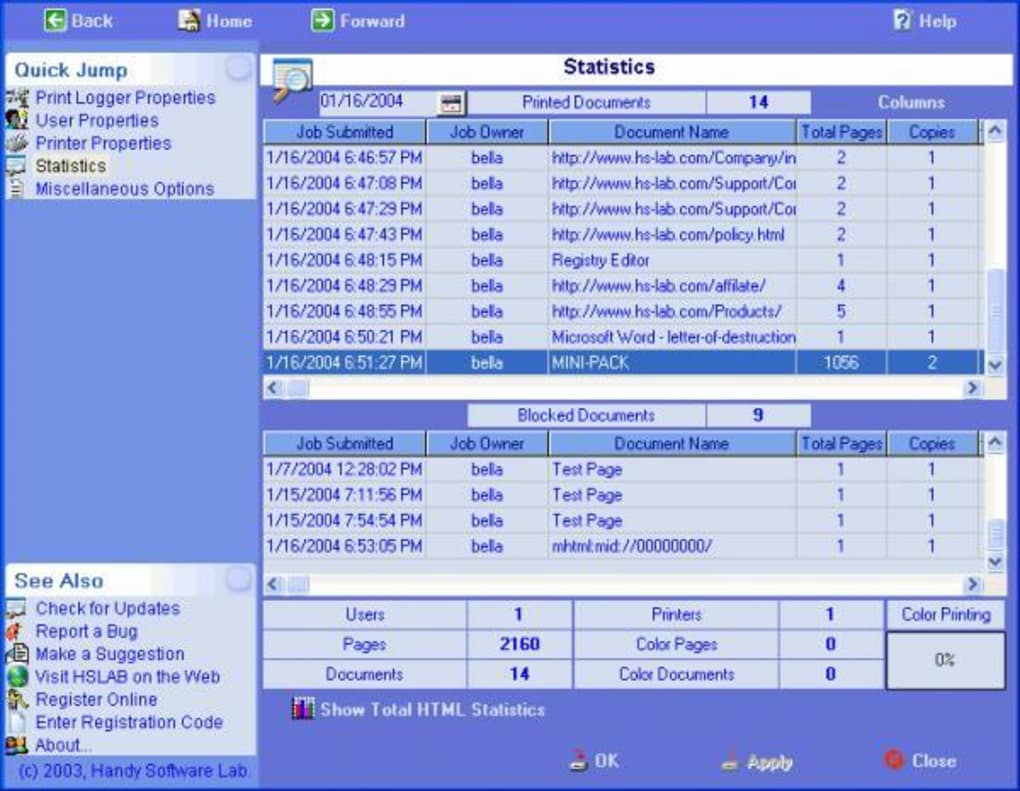
One of the standout aspects of HSLAB Print Logger SE is its comprehensive feature set tailored for print monitoring and cost control. The software includes a robust cost accounting engine, which allows administrators to track printing expenses in real time. This feature is especially beneficial for organizations aiming to implement print policies or allocate costs to departments, users, or projects. By logging every print job—including document name, user, page count, date, and time—you gain full transparency into print usage patterns. This data can be used to identify inefficiencies, prevent unauthorized printing, and support budgeting decisions.
Another major feature is the enhanced printer queue management system. Users can now view, pause, resume, and cancel print jobs with ease, making it ideal for shared office environments where multiple users access the same printer. The improved interface provides clear status updates, reducing print-related delays and improving workflow efficiency. Additionally, the hint display time option lets you customize how long tooltips and notifications remain visible, enhancing usability without overwhelming the user.
The software is also optimized for older Windows platforms, ensuring compatibility with Windows 2000, XP, and Server 2003. Despite its age, HSLAB Print Logger SE remains lightweight, consuming less storage than the average utility program. This makes it a practical choice for legacy systems where performance and resource usage are critical. With features like automatic logging, secure data storage, and a clean, user-friendly dashboard, HSLAB Print Logger SE delivers strong value for its target audience. Whether you're a system administrator or a department head, this tool simplifies the complex task of print oversight with minimal overhead.
Installation & Usage Guide for Windows Users
Installing HSLAB Print Logger SE is a straightforward process, especially for users familiar with older Windows systems. Begin by downloading the trial version from a trusted source—our secure download server ensures the file is free from malware and viruses. The installer is compact and runs without requiring administrative privileges in most cases, making it ideal for network environments with strict security policies.
Once downloaded, double-click the setup file to launch the installation wizard. The process involves selecting the installation directory (default is recommended), agreeing to the license terms, and choosing whether to create a desktop shortcut. After installation, launch the application from the Start menu or desktop icon. The main dashboard displays real-time print job logs, user activity, and cost summaries. You can customize settings by navigating to the Settings tab, where you can enable or disable logging, set up cost rules, and adjust hint display preferences.
For optimal performance, ensure that the printer spooler service is running and that HSLAB Print Logger SE has access to the print queue. The software automatically detects connected printers and begins logging jobs immediately. To monitor print activity, simply open the Log Viewer panel, where you can filter results by user, date, or document name. Exporting logs to CSV or PDF is also supported, allowing for integration with accounting or auditing tools. Regular updates are recommended, although the latest version (5.0.41.397) has not been updated since 2007. For continued use, consider purchasing a license to unlock full functionality and receive future support.
Compatibility & System Requirements
HSLAB Print Logger SE is specifically designed for older Windows operating systems, making it a reliable choice for legacy environments. The software is fully compatible with Windows 2000, Windows XP, and Windows Server 2003. This focus on stability and compatibility ensures that organizations still running older systems can benefit from advanced print monitoring without upgrading their entire infrastructure.
Due to its lightweight nature, the software has minimal system requirements. It runs efficiently on machines with as little as 128 MB of RAM and 10 MB of free disk space. This low footprint means it won’t slow down older hardware, which is crucial in environments where performance is limited. The program does not require a high-end processor or advanced graphics capabilities, making it accessible even on outdated workstations.
It’s important to note that HSLAB Print Logger SE is not available for Mac, Android, or iOS. This limitation restricts its use to Windows-only networks. However, for organizations relying on legacy Windows systems, this is not a concern. The software integrates seamlessly with standard Windows print services and does not interfere with existing printer drivers. It also supports both local and network printers, allowing centralized monitoring across multiple devices. While the lack of modern OS support may be a drawback for some, the software’s proven track record and stability on older systems make it a solid option for niche use cases.
Pros and Cons of HSLAB Print Logger SE
- Pros:
- Real-time cost accounting engine for accurate print expense tracking
- Lightweight and efficient, ideal for older Windows systems
- Improved printer queue management with pause/resume/cancel functions
- Customizable hint display timing for better user experience
- Secure, reliable logging with minimal system impact
- Free trial available with full feature access
- Cons:
- Only supports Windows 2000, XP, and Server 2003—no modern OS compatibility
- Last update was in 2007; no recent development or security patches
- Not available for Mac, Android, or iOS devices
- Requires license purchase after trial period to continue use
- Limited support for newer printing technologies and cloud services
Frequently Asked Questions (FAQ)
- Is HSLAB Print Logger SE free to use?
Yes, it offers a free trial version with full access to all features. However, after the trial period, you must purchase a license to continue using the software. The trial is ideal for testing functionality before committing to a purchase.
- Can I use HSLAB Print Logger SE on Windows 10 or 11?
No, it is not compatible with Windows 10 or 11. The software is designed for Windows 2000, XP, and Server 2003. If you're using a modern Windows system, you may need to use a virtual machine or consider alternative print monitoring tools.
- Does HSLAB Print Logger SE track print costs automatically?
Yes, it includes a built-in cost accounting engine that calculates printing expenses based on page count, user, and document type. This feature enables real-time cost tracking and reporting, helping organizations manage print budgets effectively.
- How do I export print logs from HSLAB Print Logger SE?
Logs can be exported to CSV or PDF format directly from the Log Viewer. This allows for easy sharing, archiving, or integration with accounting software for auditing purposes.
- Is HSLAB Print Logger SE secure?
Yes, the software uses secure logging practices and stores data locally without sending information to external servers. It’s recommended to run the software on a secure network and protect access with user permissions to prevent unauthorized changes.
- What should I do if HSLAB Print Logger SE doesn’t detect my printer?
Ensure the printer spooler service is running and that the printer is properly connected. Restarting the service or reinstalling the printer driver may resolve detection issues. Also, verify that HSLAB Print Logger SE has the necessary permissions to access the print queue.
Conclusion & Call to Action
HSLAB Print Logger SE remains a valuable tool for organizations still relying on older Windows systems. With its real-time cost tracking, efficient queue management, and lightweight design, it offers a reliable solution for print monitoring and policy enforcement. While its lack of modern OS support and outdated update history are notable drawbacks, its proven stability and low resource usage make it a strong choice for legacy environments.
If you’re managing a network with Windows 2000, XP, or Server 2003 systems, download HSLAB Print Logger SE today and take advantage of the free trial to see how it can help reduce printing waste and improve accountability. For long-term use, purchasing a license ensures continued access and peace of mind. Don’t miss the chance to streamline your print operations with a trusted, secure, and efficient tool.
Guides & Tutorials for HSLAB Print Logger SE
How to install HSLAB Print Logger SE
- Click the Preview / Download button above.
- Once redirected, accept the terms and click Install.
- Wait for the HSLAB Print Logger SE download to finish on your device.
How to use HSLAB Print Logger SE
This software is primarily used for its core features described above. Open the app after installation to explore its capabilities.
User Reviews for HSLAB Print Logger SE 0
No reviews found





